Rill 0.91 - Custom Visualizations, Fine-Grained Canvas Security, Exact Measures, AI Chat Memory, External MCP Servers and Email Attachments
⚡ Rill's BI-as-code powers fast dashboards, embedded analytics, and an agent-ready semantic layer — all running on top of the warehouses you already use.
📊 Custom Visualizations (Beta)
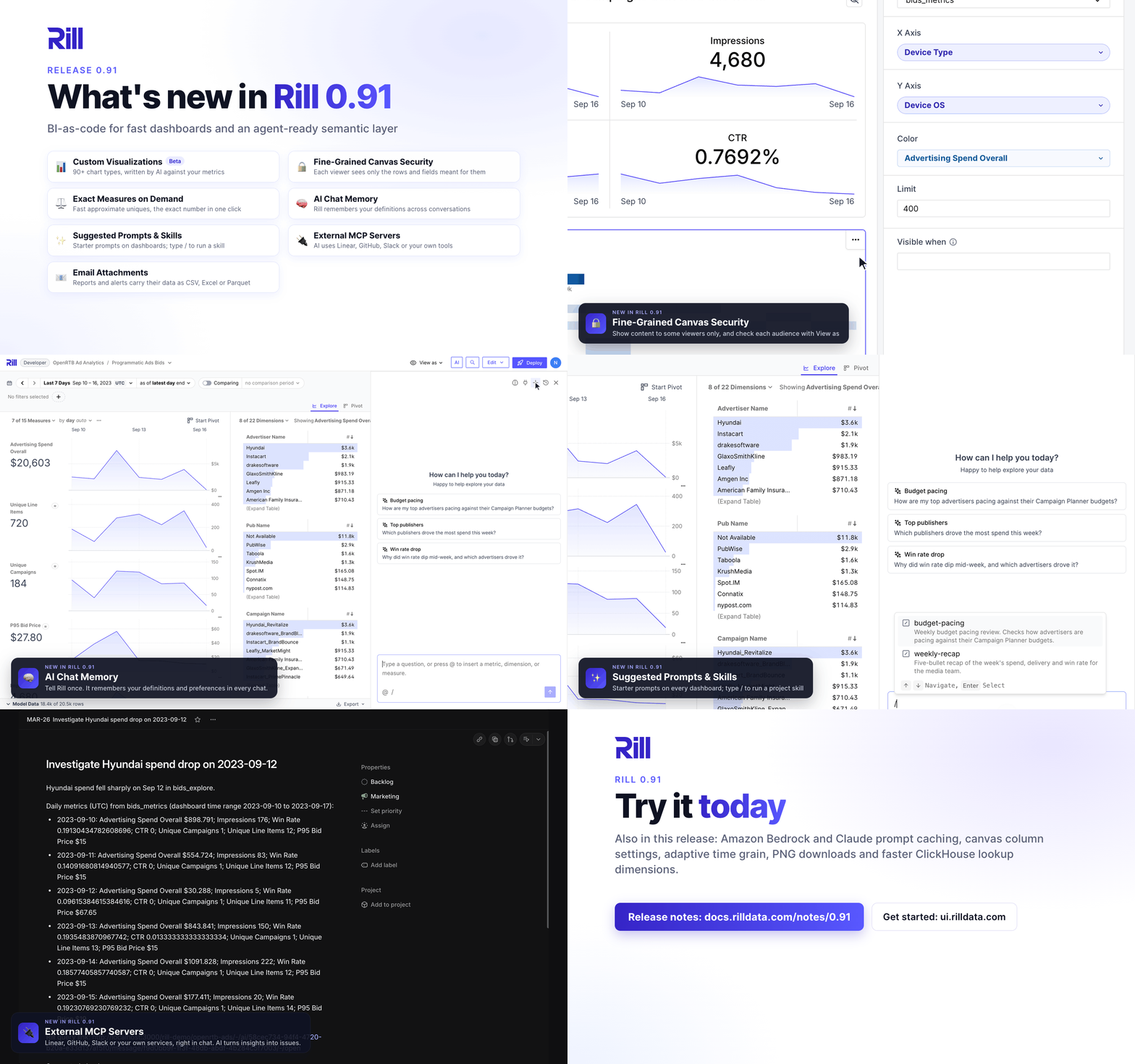
Custom viz components take canvas dashboards beyond the native chart widgets. A custom viz is a reusable component that declares its params, such as a metrics view or a measure, queries data with Metrics SQL and describes the chart with a chart type and encodings. Rill compiles it to Vega-Lite with Flint, Microsoft's open-source chart compiler, which works out scales, axes, colors and layout from your data and takes number formats from your metrics view. Pick a starting point from the gallery of 90+ chart types, from waterfall charts and box plots to heatmaps and Gantt charts, and the AI assistant builds it against your metrics views. Add it to a canvas from Your components in the widget menu, and when you need full control, Convert to Vega-Lite turns it into an editable Vega-Lite spec. Custom viz is in beta behind the custom_components feature flag; dashboards render the components they reference whether or not the flag is set.
🔒 Fine-Grained Canvas Security
One canvas can now serve several audiences. Add an if condition over user attributes to any row, tab group, tab or component, and each viewer sees only what is meant for them. Fields a viewer is not allowed to query are simply left out of tables, pivots, KPI grids and leaderboards instead of breaking the component. In the visual editor, set a condition from the Visible when field and check the result for each audience with View as.
⚖️ Exact Measures on Demand
Approximate distinct counts and quantiles keep dashboards fast on large tables, but sometimes you also need the exact number. A measure can now define an exact_expression next to its approximate expression. Dashboards keep showing the fast approximate value with a ≈ chip, and clicking the chip computes the exact value for the current filters and time range, wherever you are: big numbers, leaderboards, pivots or canvas widgets. The API accepts exact: true per measure, and the AI assistant uses it when you ask for exact or reconciled numbers.
🧠 AI Chat Memory
AI chat now remembers the preferences and clarifications you share, such as how you like numbers formatted or what "top advertisers" means to your team, and applies them in later conversations in the same project. A Memory updated notice shows when it learns something, and you can review, edit, add or delete memories at any time, or pause memory altogether. Memories are private to you and the project, and they never override the project's ai_instructions.
✨ Suggested Prompts and Skills
Give users a head start with clickable starter prompts in rill.yaml or on a dashboard, where a prompt picks up the dashboard's current filters and time range. Typing / now opens the skill picker in every chat, including dashboard, embedded and developer chats.
🔌 External MCP Servers
Rill's AI agents can now use tools from external MCP servers such as Linear, GitHub, Slack, Notion or a service your team runs, alongside Rill's built-in tools, so the AI can, for example, file a Linear issue with the numbers it just found. The chat's External tools menu lists the project's servers and their connection status. In Rill Cloud, each user connects a server with their own account from that menu, and tokens are stored encrypted per user. Internal servers can use a service token from the project's environment variables instead, and security policies control who can use which servers and tools.
📧 Email Attachments for Reports and Alerts
Report and alert emails can now carry their data as a CSV, Excel or Parquet file, so recipients no longer need to follow a link.
- Reports. For reports that run as the creator, select Attach file to emails when creating or editing a scheduled report, or set
export.attachin the report YAML. - Alerts. Alert emails used to show only the first matching row. Select Attach matching rows to emails to send all of them, optionally up to a row limit, or set
exportin the alert YAML.
Attachments are capped at 10 MB, and Slack notifications are unchanged.
🤖 Amazon Bedrock and Claude Prompt Caching
The new bedrock AI connector runs all of Rill's AI features, from chat to generating metrics views and dashboards, on a model in your own AWS account. Set ai_connector: bedrock in rill.yaml, or add it from the Add AI connector dialog in Rill Developer. Claude connectors gain a prompt_caching option that reuses the tools, system prompt and conversation between the steps of an answer, which typically lowers cost and latency.
🎨 Canvas Dashboards: Column Settings, Adaptive Time Grain and PNG Downloads
- Column settings for tables and pivots. Tables and pivots now give you per-column control over width, label, alignment, number format and wrapping, plus component-level options to fit columns to the widget, wrap headers and set the initial sort. Resize or sort a column in the visual editor and the change is written back to the YAML.
- Adaptive time grain. The new Adaptive grain, now the default in canvas and explore dashboards, follows the selected time range so charts always show a readable number of points. Picking a specific grain works as before. Canvas dashboards also gain a grain selector in the filter bar and the widget inspector, and a widget can set its own grain in
time_filters. - Download as PNG. Any canvas component can be downloaded as a PNG, with or without a header showing the dashboard title, time range, comparison and filters.
- Move and duplicate tab groups. Drag whole tab groups around in the canvas editor, or duplicate one with all of its tabs.
⚡ Performance Improvements
- Faster ClickHouse lookup dimensions. The new
lookup_group_by_keyoption resolves dictionary values once per key instead of once per row, with identical results. In a 20-million-row benchmark, a sum grouped by a lookup dimension ran more than twice as fast and listing the dimension's values ran 19 times faster. It is opt-in per dimension, so compare query times on your own data. - Faster comparisons on ClickHouse. Comparison queries over
UUIDdimensions andDecimalmeasures now aggregate the comparison range only for the values on screen by using the two-phase query with an explicit value filter, as other types already did. - Faster Databricks connections. The first connection to a serverless SQL warehouse is more than twice as fast now that the upgraded driver detects Lakehouse//RT warehouses itself, and a failed connection check is retried on the next query instead of being cached.
Bug Fixes and Improvements
Explore / Dashboards
- Added an
@measure picker and optional descriptions to ad hoc measures, and blocked duplicate display names - Added a Fit to width action to the pivot toolbar
- Raised the pivot comparison column limit from 10 measures to 20
- Fixed ad hoc measures failing to render in charts with an
Unrecognised functionerror, and the ad hoc measure dialog overflowing on dashboards with many measures - Fixed annotations with an empty
time_end, and range annotations that only partly overlap the selected time range, missing from time series charts - Fixed time series charts failing on ClickHouse when the selected time range is empty, such as a day-to-date range on daily data
- Fixed date columns and columns with display names being squeezed to their minimum width in tables and pivots
- Fixed the dimension table freezing the browser tab when resizing its dimension column, and its search being ignored when the dashboard has no active filters
- Fixed filters being ignored when an explore's
metrics_viewdiffers in letter case from the metrics view's name - Fixed URL filters being lost when the metrics view spec loads late
- Fixed Advanced filters not being removable from the filter bar
- Removed Create scheduled report from the Export menu on public URLs
- Removed home bookmarks from the bookmark listings, since opening a dashboard already shows its home view
Canvas
- Fixed pinned and required filter chips missing when a canvas is opened from the project page
- Fixed canvas components showing "No valid component" when returning to a canvas after a few minutes away
- Fixed charts briefly showing "No Data to Display" before their loading spinner, and showing nothing instead of an error when a preliminary query fails
- Fixed KPI sparklines whose values are all zero being drawn at mid-height
Alerts and Reports
- Fixed scheduled reports created or edited from an explore losing their filters, and the edit dialog showing "No filters selected" for reports that have them
Metrics Views
- Fixed
unnestdimensions on Snowflake and BigQuery, and fixed filters on unnested dimensions in Databricks expanding each row into one row per array element - Fixed filters on ClickHouse lookup dimensions ignoring rows whose key is missing from the dictionary; the null group and the
lookup_default_expressionvalue can now be selected and excluded
Models and Connectors
- Added private CA and client certificate support to the PostgreSQL connector, stored as project secrets so mutual TLS works in Rill Cloud
- Added a guide to reading Amazon S3 Tables as an Iceberg catalog, and made DuckDB connector secrets available in a model's
pre_exec - Added a
catalog_whitelistsetting to the Databricks connector to limit the catalogs listed in the data explorer - Listed BigQuery datasets across all accessible projects, and stopped listing materialized views as regular views
- Fixed the data explorer listing only the first page of a connector's databases and schemas
- Fixed table and column introspection failing on Databricks Lakehouse//RT warehouses
- Fixed ClickHouse
query_settings,query_settings_overrideand query attributes being dropped on servers in read-only settings mode - Cleaned up the
__rill_temp_*tables that interrupted ClickHouse model runs leave behind, and gave temporary tables unique names so concurrent partitions never collide - Fixed re-parsing an unchanged connector with several templated properties restarting everything downstream of it, which could cancel long model runs
- Fixed a cancelled full refresh of a partitioned model discarding the partitions it had already processed when retried
- Fixed a transient Postgres connection error being cached until the runtime restarted
- Fixed DuckDB database handles leaking when a write query fails
- Deleted the files that the
httpsconnector downloads once a model has ingested them - Returned a clear error when a glob with
partition: directoryorpartition: hivematches only folders, and un-deprecatedpartition: directory - Made opening connector connections cancellable
AI / LLM
- Fixed AI chat failing with current Claude models through the
claudeconnector; the Claude and Gemini connectors now use the model's default temperature unlesstemperatureis set - Fixed chat titles that mention a measure, dimension or metrics view showing raw reference markup when truncated
- Fixed ChatGPT rejecting the unified MCP server's
list_projectstool - Upgraded the MCP Go SDK to v1.8.0, so MCP clients receive input validation failures as tool errors instead of protocol errors
Rill Developer
- Collapsed hidden folders such as
.claudeby default in the file explorer, and listed them after visible folders - Fixed the add connector flow stalling or showing an error page while the project restarts after
.envor OLAP connector changes - Fixed timestamp values being unreadable in the cell tooltip of model and source previews
- Made
rill upgradeskip reinstalling when the CLI is already on the latest version, unless--forceis passed - Fixed
rill validaterefusing to run when another process, such as a VPN, uses port 9009
Cloud
- Fixed Rill Cloud re-parsing every project twice an hour even when nothing had changed, which cancelled in-flight model refreshes
- Stopped health checks from running live queries against a project's OLAP database and metrics views; set
rill.health.make_live_queriestotrueto turn them back on - Added
rill sudo project restart, which also moves a deployment to a new runtime provisioner when its org or project provisioner has changed - Fixed a runtime not becoming ready when a deployment is provisioned again right after being torn down
- Fixed the provisioner and deployment health checks running every few hours instead of every 10 to 15 minutes, so deployments recover sooner after a runtime restart
- Showed the "No valid payment method on file" notice only for a missing payment method rather than for every billing issue
- Fixed the in-app support chat being blocked by the content security policy
Embedding
- Fixed embedded canvases showing a read-only Advanced filter and no data when the host app passes the legacy
fparam alongside per-metrics-viewf.<metrics_view>params
Security
- Stopped runtime tokens that a service account requests without naming a user, for example through
GetIFrame, from carrying the service account as their subject, which could let an app's end users see each other's AI conversations - Fixed cached results of the metrics view rows query, which powers the explore data viewer and row exports, being shared between users with different row filters
- Upgraded
containerd, OpenTelemetry,kin-openapi,moby/sys/userandklauspost/compressto resolve Dependabot alerts
Documentation
- Added guides for View as, deployment slots and cloud editing
- Documented ad hoc measures, the canvas map widget, canvas pinned and required filters, project bookmarks, invoking skills with
/,on_schema_changefor incremental models, metrics viewquery_attributesand the unified MCP endpoint - Generated
llms.txtfrom the docs site's routes, added redirects for moved pages and fixed YAML examples that the parser rejects