Custom Viz Chart Types
The chart spec of a custom viz can draw 32 chart types, in the six families of the Chart types gallery. This page lists, for each type, what it is for, the channels it takes and the chartProperties it accepts. Channels in bold are required; the rest are optional.
The Gallery
Add → Custom viz opens a gallery of up to three examples per chart type, each with a different channel layout: a scatter plot with and without bubble sizes, a line chart with and without series. The thumbnails are drawn from sample data that ships with Flint. Filter by family or chart type in the sidebar, or search by name.
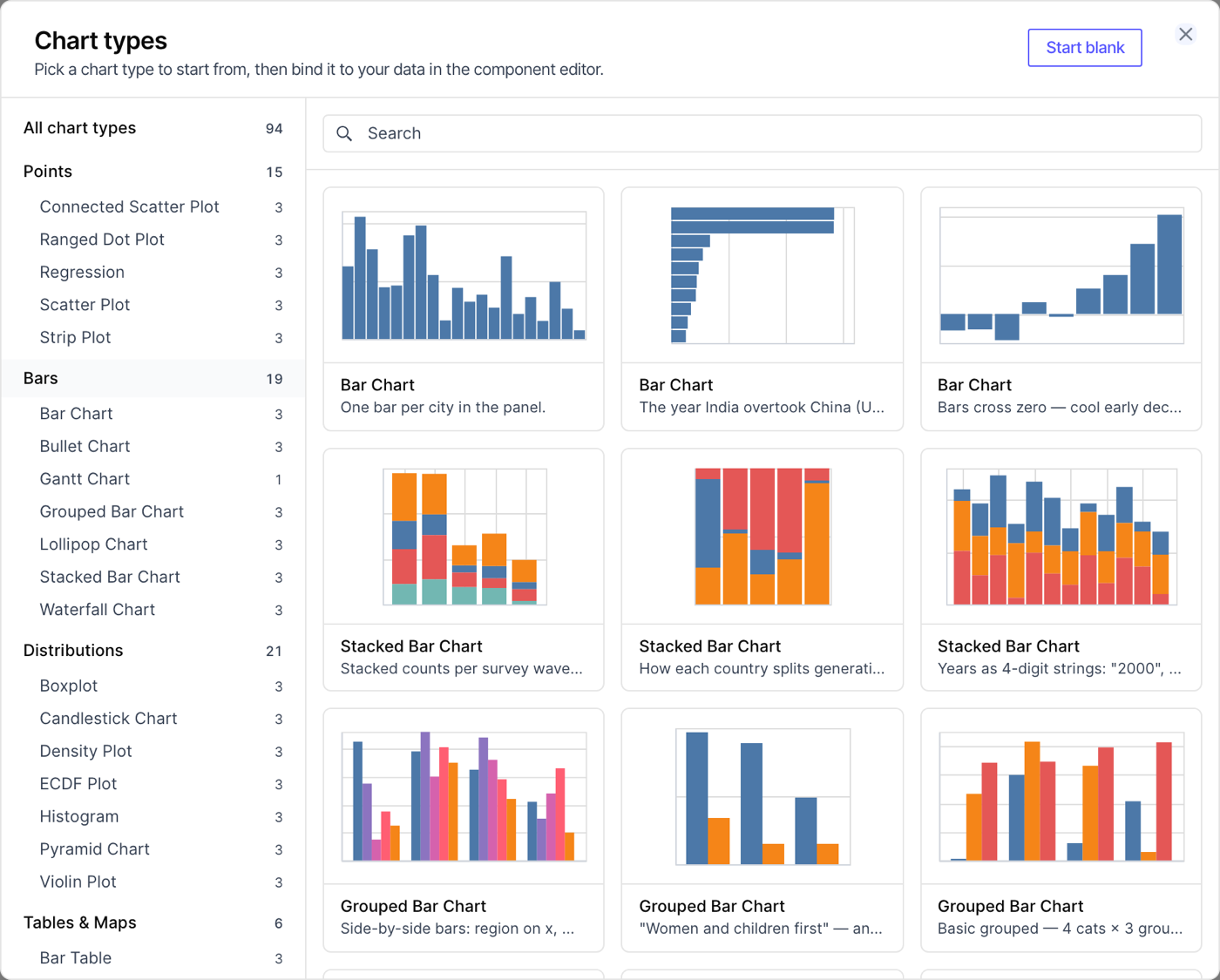
Picking an example writes a component with the same layout. Only the chart type, the channels and any chart properties carry over, never the sample data. The component declares:
- a required
metrics_viewparam; - one required param per channel, named for the channel's role (
x_axis,y_axis,x_axis_end,color,size,group,goal, and so on) and typedmeasure,dimensionortime_dimensionto match the field the example draws there; - for charts that plot individual observations, a required
detaildimension, described in Row Limits; - a
limitparam, with a default suited to how many marks the chart draws; - a
metrics_sqlquery that selects those fields, ordered by time for a time series and by the measure otherwise.
The examples below are bound to the bids_metrics metrics view of the OpenRTB example project. Each shows the component's custom_chart block; the params it references are declared as described above.
Points
Charts that draw a point per row: scatter plots and their variants for the relationship between two measures, and dot and strip plots for values per category. Scatter plots, regressions and strip plots plot individual observations, so their components select a detail dimension that sets what each point represents.
| Chart type | Use it for | Channels | Chart properties |
|---|---|---|---|
| Scatter Plot | The relationship between two measures | x, y, color, size, shape, opacity, column, row | opacity |
| Regression | A scatter plot with a fitted trend line | x, y, color, size, column, row | regressionMethod, polyOrder |
| Connected Scatter Plot | How two measures move together over time | x, y, order, color, detail, column, row | |
| Ranged Dot Plot | The gap between two values per category, drawn as a dumbbell | x, y, color | |
| Strip Plot | The spread of individual values per category | x, y, color, size, column, row | stepWidth, pointSize, opacity |
- Regression:
regressionMethodislinear(the default),log,exp,pow,quadorpoly;polyOrdersets the degree of apolyfit, from 2 to 10. - Connected Scatter Plot:
orderis the sequence the points are connected in, usually a time dimension. - Ranged Dot Plot: bind
colorto a dimension with exactly two values, one for each end of the dumbbell. - Strip Plot:
stepWidthsets the jitter spread, from 10 to 100.
A bubble chart of advertisers: average bid price against win rate, sized by impressions and colored by creative type, with detail bound to advertiser_name so each point is one advertiser.
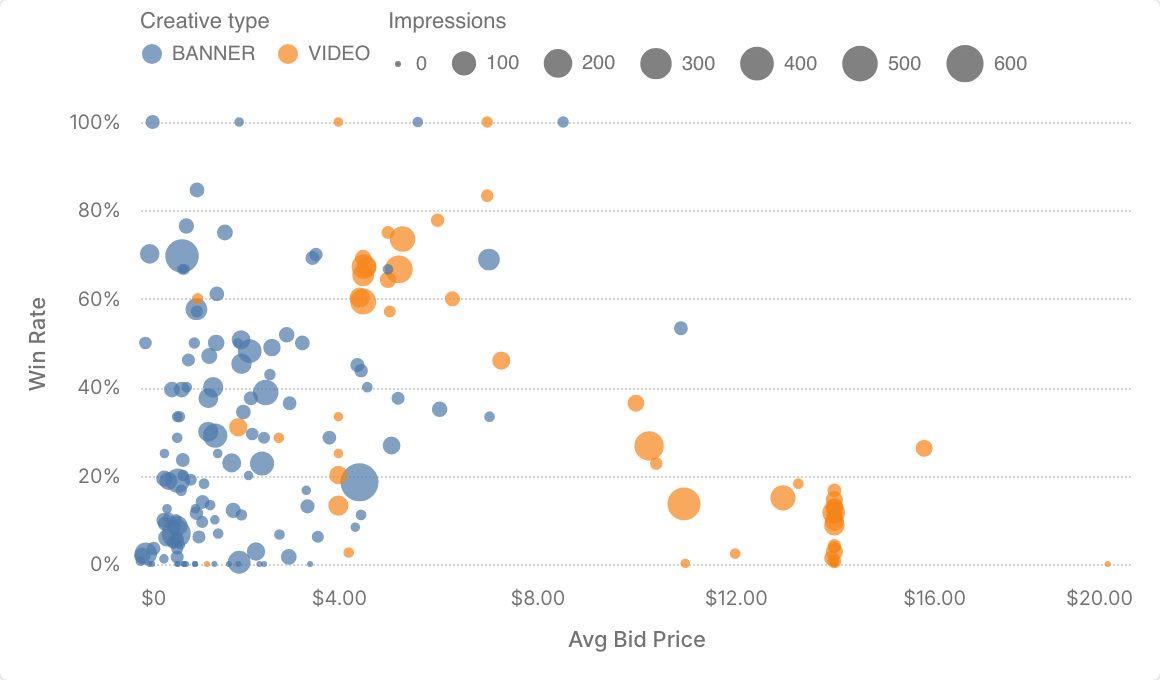
custom_chart:metrics_sql: |SELECT {{ .params.x_axis }}, {{ .params.y_axis }}, {{ .params.size }},{{ .params.color }}, {{ .params.detail }}FROM {{ .params.metrics_view }}ORDER BY {{ .params.size }} DESCLIMIT {{ .params.limit }}spec:chartType: Scatter Plotencodings:x: { field: "{{ .params.x_axis }}" }y: { field: "{{ .params.y_axis }}" }size: { field: "{{ .params.size }}" }color: { field: "{{ .params.color }}" }
Bars
Charts that compare a measure across categories. Put the category on x and the measure on y for vertical bars, or the other way around for horizontal bars.
| Chart type | Use it for | Channels | Chart properties |
|---|---|---|---|
| Bar Chart | Comparing a measure across categories | x, y, color, opacity, column, row | cornerRadius |
| Grouped Bar Chart | Side-by-side bars for a second category | x, y, group, column, row | dodge |
| Stacked Bar Chart | The parts that make up each bar | x, y, color, column, row | stackMode |
| Lollipop Chart | A lighter alternative to a bar chart | x, y, color, column, row | dotSize |
| Waterfall Chart | How a sequence of increases and decreases adds up | x, y, color, column, row | totals, cornerRadius, showTextLabels |
| Gantt Chart | Intervals on a shared axis | y, x, x2, color, detail, column, row | taskHeight, cornerRadius, intervalLabels |
| Bullet Chart | A measure against a target | y, x, goal, color, column, row |
- Grouped Bar Chart: the second category goes on
group, notcolor.dodgeisauto(the default),localorglobal. - Stacked Bar Chart:
stackMode: normalizestacks to 100%, andcentercenters each stack. - Waterfall Chart: each row is one step, and the bars float at the running total.
totalsdecides which bars are drawn from zero as totals:auto(the default),none,first,lastorboth. Leavecolorunbound; increases and decreases are colored by sign. - Gantt Chart:
xis where an interval starts andx2where it ends. - Bullet Chart: the
goalmeasure is drawn as a tick on each bar, and each bar is colored by whether it reaches its goal.
A bullet chart of average bid price by device type, with the average bid floor as the target.
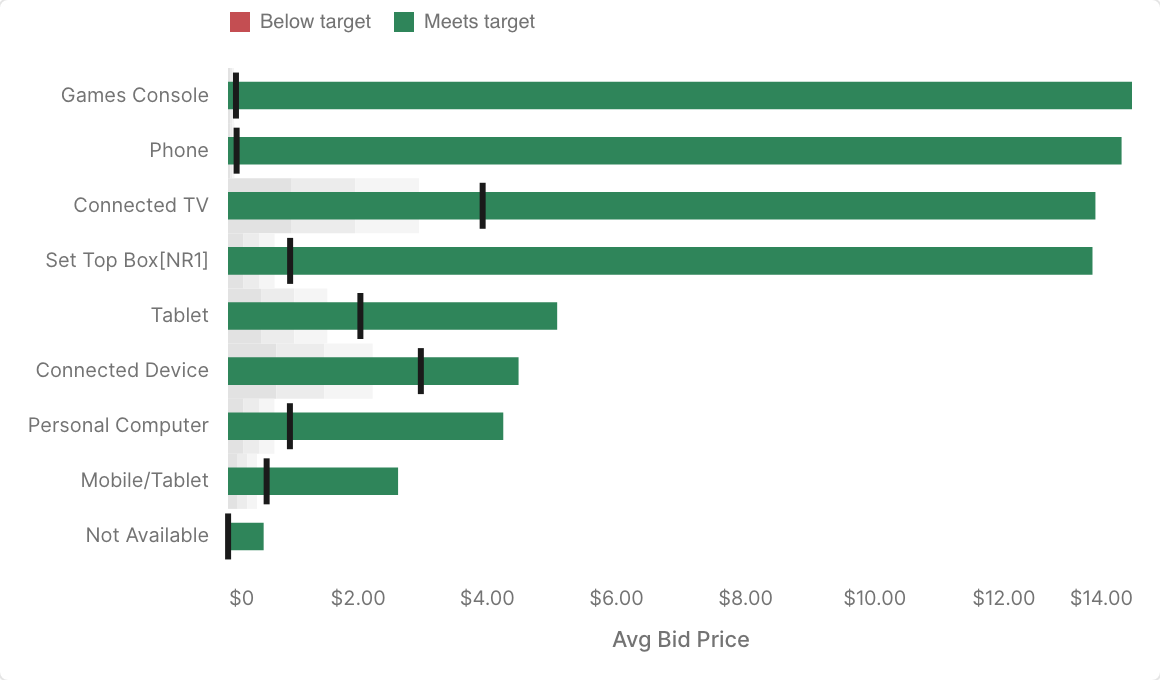
custom_chart:metrics_sql: |SELECT {{ .params.y_axis }}, {{ .params.x_axis }}, {{ .params.goal }}FROM {{ .params.metrics_view }}ORDER BY {{ .params.x_axis }} DESCLIMIT {{ .params.limit }}spec:chartType: Bullet Chartencodings:y: { field: "{{ .params.y_axis }}" }x: { field: "{{ .params.x_axis }}" }goal: { field: "{{ .params.goal }}" }
Distributions
Charts that summarize how values are spread. Histograms, density plots, ECDF plots, box plots and violin plots summarize individual observations, so their components select a detail dimension.
| Chart type | Use it for | Channels | Chart properties |
|---|---|---|---|
| Histogram | The distribution of a measure, in bins | x, color, column, row | binCount |
| Density Plot | The distribution of a measure, as a smooth curve | x, color, column, row | bandwidth |
| ECDF Plot | The share of values at or below each value | x, color, detail, column, row | showPoints |
| Boxplot | Medians, quartiles and outliers per category | x, y, color, opacity, column, row | whiskerMethod, showOutliers, dodge |
| Violin Plot | The shape of a distribution per category | x, y, color, row | bandwidth |
| Pyramid Chart | Two groups compared side by side across categories | x, y, color | |
| Candlestick Chart | Open, high, low and close over time | x, open, high, low, close, column, row |
- Histogram:
binCountcaps the number of bins, from 5 to 50. - Density Plot and Violin Plot:
bandwidthsets the smoothing, from 0.05 to 2; leave it unset to pick one from the data. - Boxplot:
whiskerMethodisiqr(1.5 times the interquartile range, the default) orminmax. - Pyramid Chart: bind
colorto a dimension with exactly two values, one for each side.
The spread of average bid price across advertisers, per device type, with detail bound to advertiser_name.
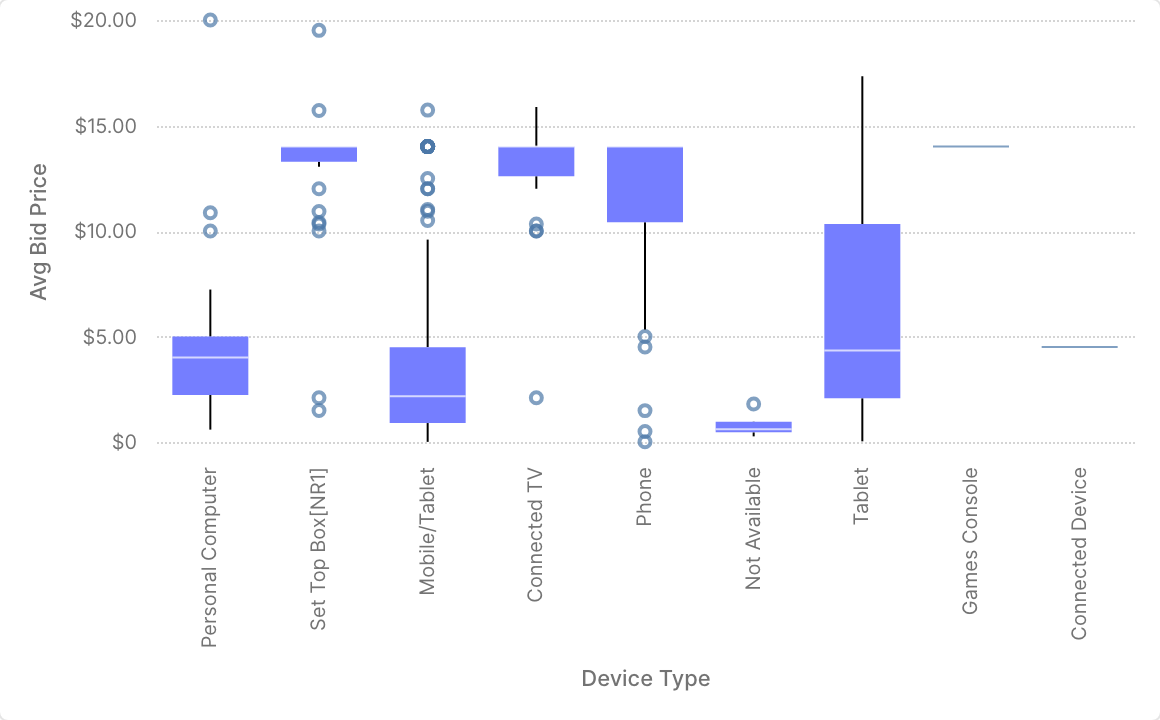
custom_chart:metrics_sql: |SELECT {{ .params.x_axis }}, {{ .params.y_axis }}, {{ .params.detail }}FROM {{ .params.metrics_view }}ORDER BY {{ .params.y_axis }} DESCLIMIT {{ .params.limit }}spec:chartType: Boxplotencodings:x: { field: "{{ .params.x_axis }}" }y: { field: "{{ .params.y_axis }}" }
Tables & Maps
Grids that show a measure for each combination of two categories, or rank categories in a compact table. Maps are not offered here; use the Map widget instead.
| Chart type | Use it for | Channels | Chart properties |
|---|---|---|---|
| Heatmap | A measure across two categories, or a category over time | x, y, color, column, row | showTextLabels |
| Bar Table | A ranked list with inline bars and values | y, x, color, column, row | maxRows, showPercent |
- Heatmap: the measure goes on
color. - Bar Table:
maxRowscaps the rows shown, from 5 to 100, andshowPercentadds each row's share of the total.
Daily spend by device type. The query truncates the time dimension to a day, so the heatmap stays daily whatever the dashboard's time grain.
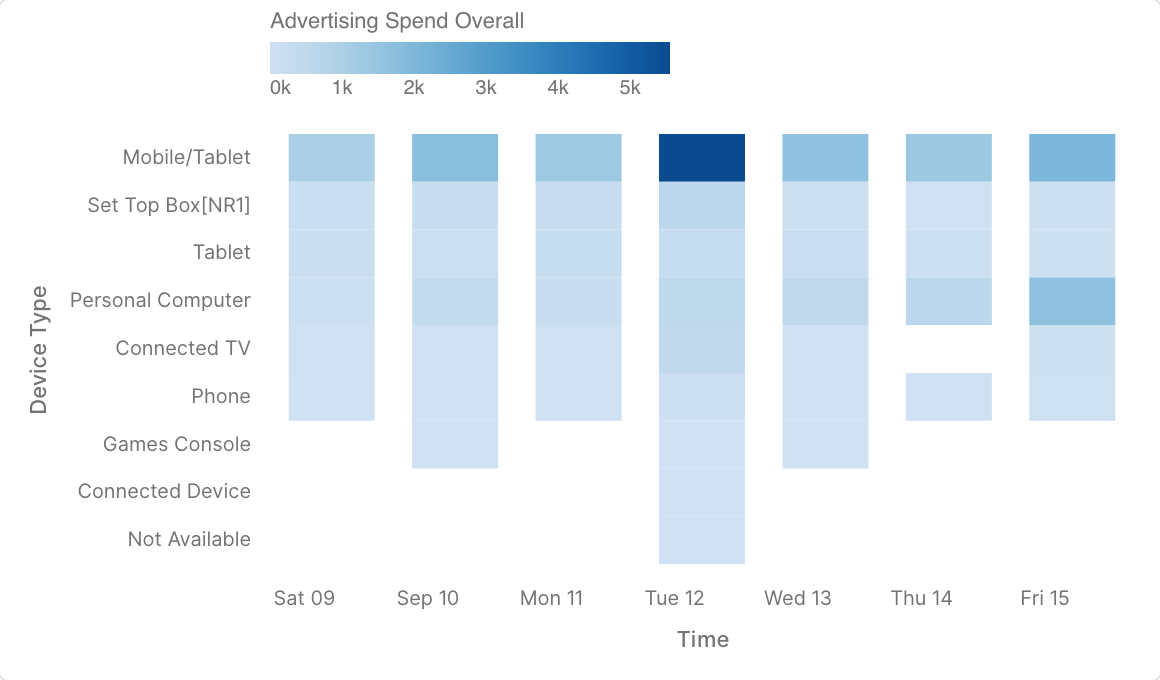
custom_chart:metrics_sql: |SELECT date_trunc('day', {{ .params.x_axis }}) AS {{ .params.x_axis }},{{ .params.y_axis }}, {{ .params.color }}FROM {{ .params.metrics_view }}ORDER BY {{ .params.x_axis }}, {{ .params.color }} DESCLIMIT {{ .params.limit }}spec:chartType: Heatmapencodings:x: { field: "{{ .params.x_axis }}" }y: { field: "{{ .params.y_axis }}" }color: { field: "{{ .params.color }}" }
Lines & Areas
Charts that follow a measure along an ordered axis, usually time.
| Chart type | Use it for | Channels | Chart properties |
|---|---|---|---|
| Line Chart | A measure over time, optionally split into series | x, y, color, strokeDash, detail, opacity, column, row | interpolate, showPoints |
| Sparkline | Compact trend lines, one row per series | x, y, color, detail, column, row | interpolate, baseline, trendWidth |
| Bump Chart | How the rank of each series changes over time | x, y, color, detail, column, row | |
| Slope Chart | Change between two periods, one line per category | x, y, color, detail, column, row | |
| Area Chart | A measure over time, stacked by series | x, y, color, opacity, column, row | interpolate, opacity, stackMode |
| Streamgraph | Stacked series around a center line | x, y, color, column, row | interpolate |
| Range Area Chart | A band between a low and a high measure | x, y, y2, color, column, row | interpolate, opacity |
interpolateislinear(the default),monotone,step,step-before,step-after,basis,cardinalorcatmull-rom.- Sparkline:
baselinedraws a reference line in each row at themean(the default),medianorzero, ornone;trendWidthsets the width of each line in pixels. - Bump Chart:
ymust already hold ranks, with 1 as the best. The chart reverses the axis to put rank 1 on top but doesn't rank values itself, and Metrics SQL can't compute ranks. - Slope Chart: bind
xto a dimension with exactly two values, the two periods. - Area Chart:
stackModeisnormalizefor 100% stacks,center, orlayeredto overlap the series instead of stacking them.
The band between the average bid floor and the average bid price, by day.
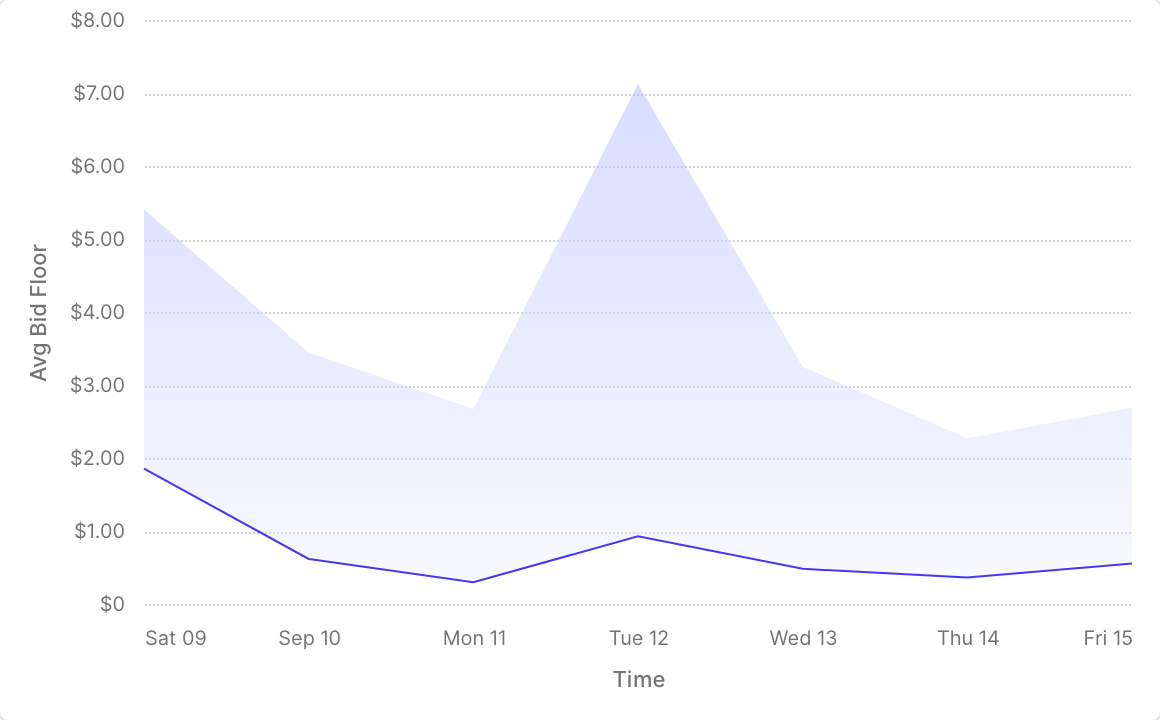
custom_chart:metrics_sql: |SELECT {{ .params.x_axis }}, {{ .params.y_axis }}, {{ .params.y_axis_end }}FROM {{ .params.metrics_view }}ORDER BY {{ .params.x_axis }}LIMIT {{ .params.limit }}spec:chartType: Range Area Chartencodings:x: { field: "{{ .params.x_axis }}" }y: { field: "{{ .params.y_axis }}" }y2: { field: "{{ .params.y_axis_end }}" }
Circular
Charts drawn around a center. Pie and donut charts read best with a handful of slices; components from the gallery default to 10 rows.
| Chart type | Use it for | Channels | Chart properties |
|---|---|---|---|
| Pie Chart | Shares of a total | size, color, column, row | innerRadius, sortSlices |
| Donut Chart | Shares of a total, with a hole in the middle | size, color, column, row | innerRadius, sortSlices |
| Rose Chart | A measure per category, as wedges of varying length | x, y, color, column, row | alignment, padAngle, sortSlices |
| Radar Chart | Several measures or categories compared as a polygon | x, y, color, column, row | filled, fillOpacity, strokeWidth |
- Pie Chart and Donut Chart: the measure goes on
sizeand the category oncolor.innerRadiusis the size of the hole as a percentage of the radius, from 0 to 100; aPie Chartwith aninnerRadiusabove 0 is a donut.sortSlicesisnone(the default),descendingorascending. - Rose Chart:
padAnglesets the gap between wedges, from 0 to 0.1, andalignmentisleftorcenter. - Radar Chart:
filled(on by default) fills each polygon, withfillOpacityfrom 0 to 0.5;strokeWidthsets the line width.
Share of spend by player size.
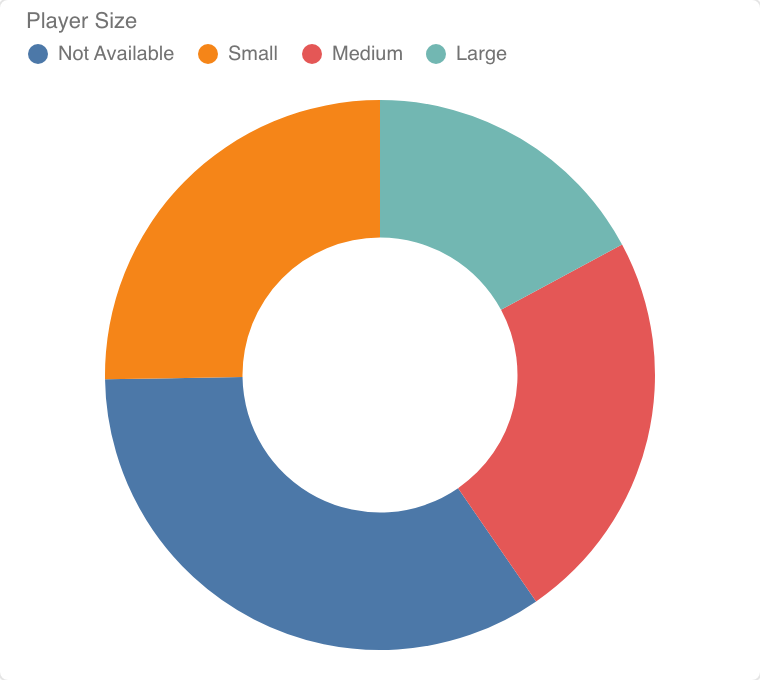
custom_chart:metrics_sql: |SELECT {{ .params.color }}, {{ .params.size }}FROM {{ .params.metrics_view }}ORDER BY {{ .params.size }} DESCLIMIT {{ .params.limit }}spec:chartType: Donut Chartencodings:size: { field: "{{ .params.size }}" }color: { field: "{{ .params.color }}" }chartProperties:innerRadius: "{{ .params.inner_radius }}"
Properties Shared Across Chart Types
These properties are shared by many chart types; a chart type that doesn't support one ignores it. Set them only to override what Rill derives.
| Property | Values | Effect |
|---|---|---|
logScale_x, logScale_y | true or false | Use a logarithmic scale on the axis. |
includeZero_x, includeZero_y | true or false | Force the axis to include zero, or not. |
independentYAxis | true or false | With small multiples, give each panel its own y scale. |
xAxisType, yAxisType | temporal or nominal | Draw a time axis as discrete bands, or the reverse. Bar, lollipop, line, area and heatmap charts. |