Customize a Custom Viz with Vega-Lite
A chart spec draws the chart types Flint knows, with the encodings and properties each one exposes. For anything beyond that, such as a reference line, an annotation, a second axis, a computed series, an interaction, or exact control over an axis, a legend or the colors, convert the component to Vega-Lite and edit the spec directly.
Converting replaces the chart spec with the Vega-Lite it compiles to. It is a one-way change, and it gives up what makes a chart spec adapt: Rill no longer derives scales, axes, formats, sorting, stacking and layout from the data, and the Vega-Lite reflects the data it was compiled against. Check first whether a different chart type, sortBy, scheme or a chart property does what you need.
Convert a Component
- Open the component in the component editor, and set Test values that represent how dashboards use it. Use this dashboard's values in the Used by panel loads a dashboard's bindings. Rill compiles the chart against these values, so their data shapes the Vega-Lite it writes.
- Click Convert to Vega-Lite and confirm.
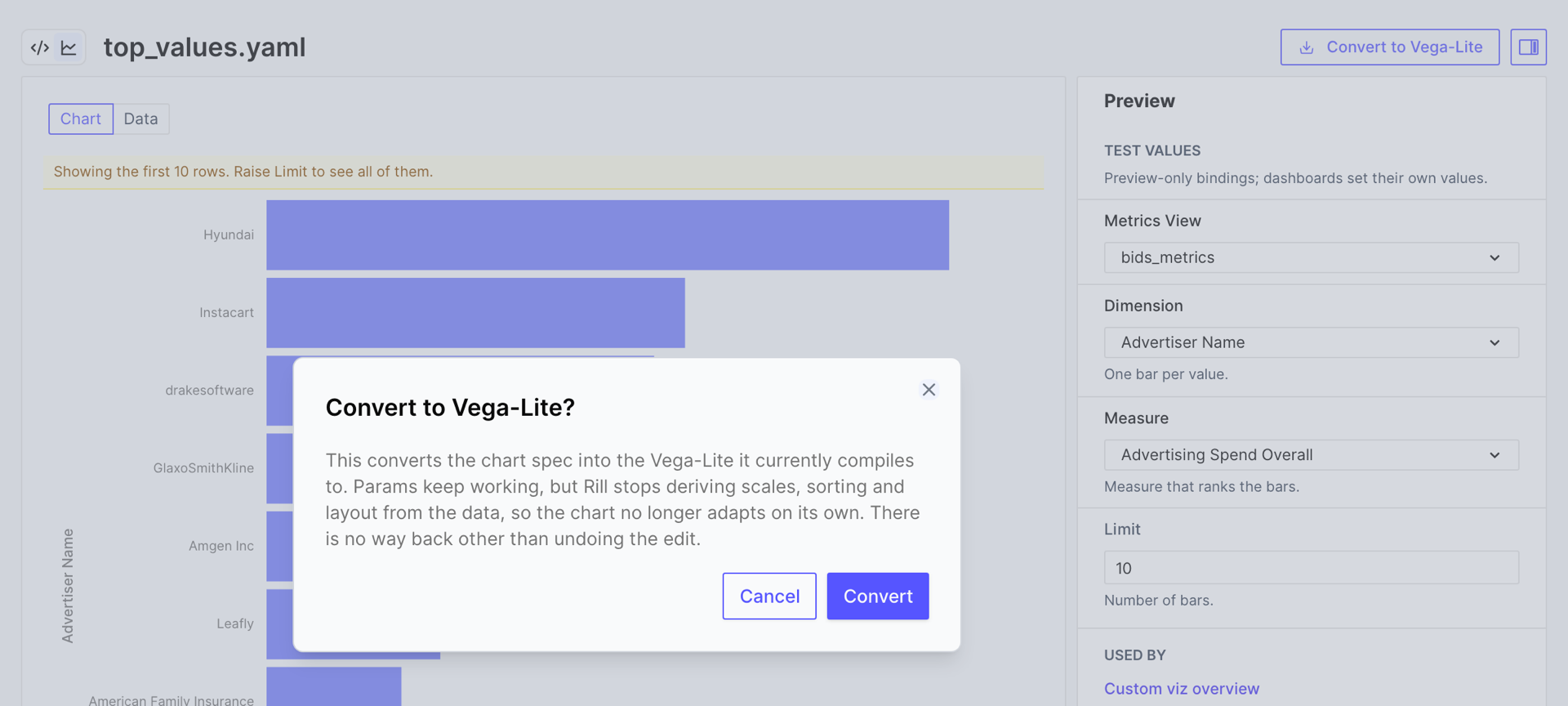
Rill replaces spec with vega_spec. The params and the query don't change, so every dashboard that uses the component keeps working, and the chart looks the same until you edit it. Once a component has a vega_spec, the button is no longer shown. To return to the chart spec, undo the edit or restore the file from version control.
What Converting Writes
Converting a ranked bar chart, bound in the editor to advertiser_name and overall_spend:
custom_chart:
  metrics_sql: |
    SELECT {{ .params.dimension }}, {{ .params.measure }}
    FROM {{ .params.metrics_view }}
    ORDER BY {{ .params.measure }} DESC
    LIMIT {{ .params.limit }}
  spec:
    chartType: Bar Chart
    encodings:
      y: { field: "{{ .params.dimension }}", sortBy: x, sortOrder: descending }
      x: { field: "{{ .params.measure }}" }
writes:
custom_chart:
  metrics_sql: |
    SELECT {{ .params.dimension }}, {{ .params.measure }}
    FROM {{ .params.metrics_view }}
    ORDER BY {{ .params.measure }} DESC
    LIMIT {{ .params.limit }}
  vega_spec: |-
    {
      "$schema": "https://vega.github.io/schema/vega-lite/v5.json",
      "width": "container",
      "height": "container",
      "autosize": {
        "type": "fit",
        "contains": "padding"
      },
      "data": {
        "name": "query1"
      },
      "mark": "bar",
      "encoding": {
        "x": {
          "field": "{{ .params.measure }}",
          "type": "quantitative",
          "title": "{{ .fields.measure.display_name }}",
          "scale": {
            "zero": true
          },
          "axis": {
            "formatType": "{{ .fields.measure.format_type }}"
          },
          "formatType": "{{ .fields.measure.format_type }}"
        },
        "y": {
          "field": "{{ .params.dimension }}",
          "type": "nominal",
          "sort": "-x",
          "title": "{{ .fields.dimension.display_name }}"
        }
      },
      "config": {
        "axisX": {
          "labelLimit": 100,
          "labelFontSize": 10,
          "titleFontSize": 11
        },
        "axisY": {
          "labelFontSize": 10,
          "titleFontSize": 11
        },
        "legend": {
          "labelFontSize": 10,
          "titleFontSize": 11
        },
        "facet": {
          "spacing": 32
        },
        "mark": {
          "tooltip": true
        }
      }
    }
The compiled spec contained the test values: field names, display names and formatter names. Rill turns each back into a template reference before writing the file, so the spec keeps working for every binding:
| In the compiled spec | Written as |
|---|---|
A field name, in an encoding, a transform or a datum expression | {{ .params.<param> }} |
| A field's display name, as an axis, legend or tooltip title | {{ .fields.<param>.display_name }} |
A measure's formatter, in formatType | {{ .fields.<param>.format_type }} |
The config block holds the label sizes and spacing the chart was compiled with, and "tooltip": true adds a tooltip for every encoded field.
Rules for a Component's Vega-Lite
These apply to every vega_spec in a component file, converted or written by hand:
- Data: read the query result from
"data": { "name": "query1" }. A component runs one query, so there is no other dataset; don't inlinevaluesor load aurl. - Size: keep
"width": "container","height": "container"and"autosize": { "type": "fit", "contains": "padding" }so the chart fills its widget. Withoutautosize, only the width is fitted, and axes and legends can run past the bottom of the widget. Vega-Lite can't size faceted or concatenated views to a container; give their panels fixed sizes. - Types: set
typeon every encoding. Nothing is derived any more, and a missing type can draw the wrong scale. - Time: encode a time dimension as
temporal. The query still buckets it at the dashboard's time grain, as described in Time Dimensions. Vega-Lite labels times in the viewer's browser time zone; on a dashboard that uses UTC, add"scale": { "type": "utc" }to the encoding so the labels match the buckets for every viewer. - Bindings: template field names, titles and formats instead of writing them literally, so the component keeps working when a dashboard binds other fields.
A component can't have both spec and vega_spec; Rill reports an error when it parses the file.
Templating
| Reference | Value |
|---|---|
{{ .params.<name> }} | The value bound to any param. |
{{ .fields.<name>.name }} | The field name, the same as {{ .params.<name> }}. |
{{ .fields.<name>.display_name }} | The field's display name from the metrics view; Time for the primary time dimension. |
{{ .fields.<name>.format_type }} | The name of the formatter Rill registers for a measure, for use as formatType. |
{{ .fields.<name>.format_d3 }} | The measure's format_d3, if it sets one. |
{{ .fields.<name>.format_preset }} | The measure's format_preset, if it sets one. |
{{ .fields.<name>.type }} | The param's type: measure, dimension or time_dimension. |
.fields exists for measure, dimension and time_dimension params. Rill rejects a reference to .fields on another type of param, or to a property not listed here, when it parses the file.
Values are JSON-escaped when they are substituted into vega_spec, so a display name or string param containing a quote or backslash is safe inside any JSON string. Keep every placeholder inside a JSON string, such as "title": "{{ .fields.measure.display_name }}"; a string param cannot carry a JSON fragment to splice in as structure.
Format values with "formatType": "{{ .fields.<name>.format_type }}" rather than a format string. It formats a measure the way Rill formats it everywhere else, including currency, percentage and interval presets. Set it on an axis, on a tooltip or text encoding, or on a field you compute from the measure, such as a running total. The formatter is also a function you can call in an expression, as the reference line example does to format its label.
Scalar Params in Expressions
string, number and boolean params are also added to the spec's top-level params, so Vega expressions, predicates and conditions can read them by name: a number param named target is available as target. If the spec already declares a top-level param with that name, Rill sets only its value.
Examples
The examples below are converted components bound to the bids_metrics metrics view, each shown as its vega_spec. Each names the params its spec references, and its query selects those fields as described in The Query. The Vega-Lite example gallery has many more patterns to adapt: replace the example's data with { "name": "query1" }, its field names with param references, and its size settings with the container settings above.
A Reference Line
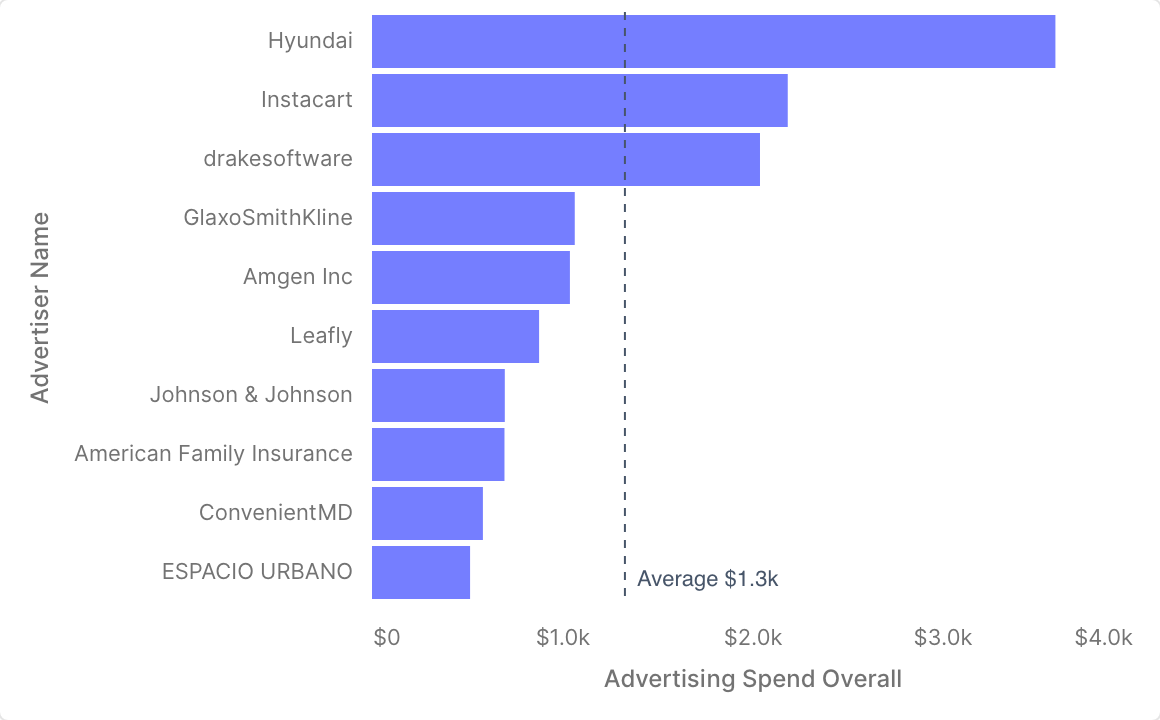
Bars ranked by a measure, with a dashed line at their average. This is the converted bar chart above, with the same dimension and measure params and query. The second layer aggregates the rows to their mean and builds the label by calling the measure's formatter, so the average reads $1.3k for a currency measure and 12% for a percentage.
vega_spec: |
  {
    "$schema": "https://vega.github.io/schema/vega-lite/v5.json",
    "width": "container",
    "height": "container",
    "autosize": { "type": "fit", "contains": "padding" },
    "data": { "name": "query1" },
    "layer": [
      {
        "mark": "bar",
        "encoding": {
          "y": {
            "field": "{{ .params.dimension }}",
            "type": "nominal",
            "sort": "-x",
            "title": "{{ .fields.dimension.display_name }}"
          },
          "x": {
            "field": "{{ .params.measure }}",
            "type": "quantitative",
            "title": "{{ .fields.measure.display_name }}",
            "axis": { "formatType": "{{ .fields.measure.format_type }}" }
          },
          "tooltip": [
            { "field": "{{ .params.dimension }}", "title": "{{ .fields.dimension.display_name }}" },
            {
              "field": "{{ .params.measure }}",
              "type": "quantitative",
              "title": "{{ .fields.measure.display_name }}",
              "formatType": "{{ .fields.measure.format_type }}"
            }
          ]
        }
      },
      {
        "transform": [
          { "aggregate": [{ "op": "mean", "field": "{{ .params.measure }}", "as": "average" }] },
          { "calculate": "'Average ' + {{ .fields.measure.format_type }}(datum.average)", "as": "label" }
        ],
        "encoding": { "x": { "field": "average", "type": "quantitative" } },
        "layer": [
          { "mark": { "type": "rule", "strokeDash": [4, 4], "color": "#475569" } },
          {
            "mark": { "type": "text", "align": "left", "baseline": "bottom", "dx": 6, "dy": -6, "color": "#475569" },
            "encoding": { "y": { "value": "height" }, "text": { "field": "label" } }
          }
        ]
      }
    ]
  }
The y encoding sits in the bar layer only. Placed at the top level, the rule layer would inherit it and draw one line per bar.
Highlight Values That Meet a Target
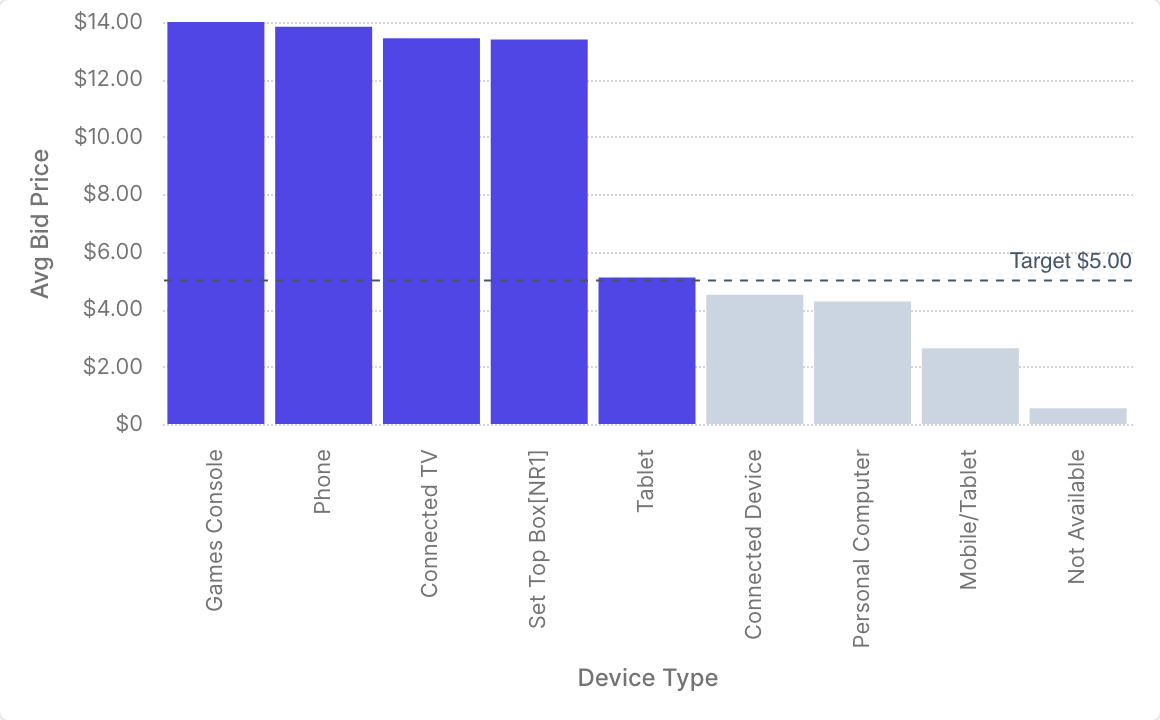
Bars that reach a target in one color and the rest in grey, with the target drawn as a line. The target is a number param, so each dashboard sets its own:
params:
  # metrics_view, dimension, measure and limit as before
  - name: target
    type: number
    default: 0
    description: Bars at or above this value are highlighted.
The color condition and the line read the param by name, target, because Rill adds scalar params to the spec's params. The chart below binds avg_bid_price with a target of 5.
vega_spec: |
  {
    "$schema": "https://vega.github.io/schema/vega-lite/v5.json",
    "width": "container",
    "height": "container",
    "autosize": { "type": "fit", "contains": "padding" },
    "data": { "name": "query1" },
    "layer": [
      {
        "mark": "bar",
        "encoding": {
          "x": {
            "field": "{{ .params.dimension }}",
            "type": "nominal",
            "sort": "-y",
            "title": "{{ .fields.dimension.display_name }}"
          },
          "y": {
            "field": "{{ .params.measure }}",
            "type": "quantitative",
            "title": "{{ .fields.measure.display_name }}",
            "axis": { "formatType": "{{ .fields.measure.format_type }}" }
          },
          "color": {
            "condition": { "test": "datum['{{ .params.measure }}'] >= target", "value": "#4f46e5" },
            "value": "#cbd5e1"
          },
          "tooltip": [
            { "field": "{{ .params.dimension }}", "title": "{{ .fields.dimension.display_name }}" },
            {
              "field": "{{ .params.measure }}",
              "type": "quantitative",
              "title": "{{ .fields.measure.display_name }}",
              "formatType": "{{ .fields.measure.format_type }}"
            }
          ]
        }
      },
      {
        "transform": [
          { "aggregate": [{ "op": "count", "as": "rows" }] },
          { "calculate": "target", "as": "target_value" },
          { "calculate": "'Target ' + {{ .fields.measure.format_type }}(target)", "as": "label" }
        ],
        "encoding": { "y": { "field": "target_value", "type": "quantitative" } },
        "layer": [
          { "mark": { "type": "rule", "strokeDash": [4, 4], "color": "#475569" } },
          {
            "mark": { "type": "text", "align": "right", "baseline": "bottom", "dy": -4, "color": "#475569" },
            "encoding": { "x": { "value": "width" }, "text": { "field": "label" } }
          }
        ]
      }
    ]
  }
The aggregate transform reduces the rows to one, so the line and its label are drawn once.
A Second Axis
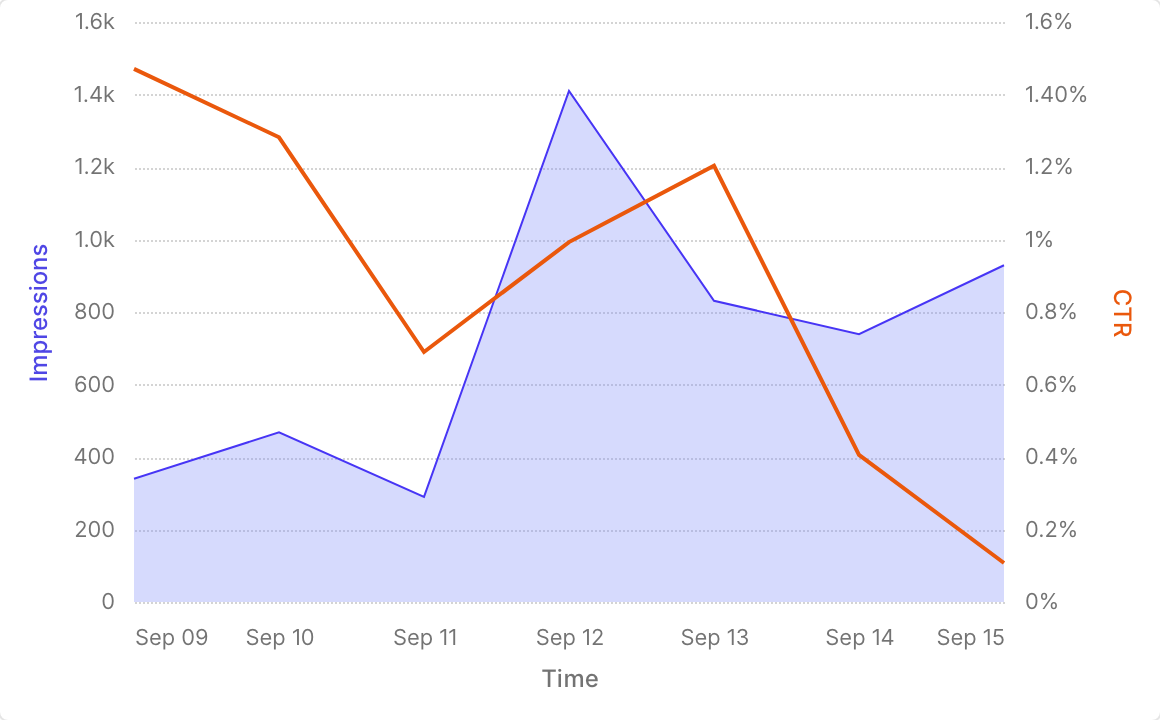
A volume measure as an area on the left axis and a rate as a line on the right. The params are a time dimension, x_axis, and two measures, area_measure and line_measure. resolve gives each layer its own y scale, and each axis title takes the color of its series. The time axis is formatted explicitly, with one tick per day.
vega_spec: |
  {
    "$schema": "https://vega.github.io/schema/vega-lite/v5.json",
    "width": "container",
    "height": "container",
    "autosize": { "type": "fit", "contains": "padding" },
    "data": { "name": "query1" },
    "encoding": {
      "x": {
        "field": "{{ .params.x_axis }}",
        "type": "temporal",
        "title": "{{ .fields.x_axis.display_name }}",
        "axis": { "format": "%b %d", "tickCount": "day" }
      },
      "tooltip": [
        { "field": "{{ .params.x_axis }}", "type": "temporal", "title": "{{ .fields.x_axis.display_name }}" },
        {
          "field": "{{ .params.area_measure }}",
          "type": "quantitative",
          "title": "{{ .fields.area_measure.display_name }}",
          "formatType": "{{ .fields.area_measure.format_type }}"
        },
        {
          "field": "{{ .params.line_measure }}",
          "type": "quantitative",
          "title": "{{ .fields.line_measure.display_name }}",
          "formatType": "{{ .fields.line_measure.format_type }}"
        }
      ]
    },
    "layer": [
      {
        "mark": { "type": "area", "color": "#818cf8", "opacity": 0.4 },
        "encoding": {
          "y": {
            "field": "{{ .params.area_measure }}",
            "type": "quantitative",
            "title": "{{ .fields.area_measure.display_name }}",
            "axis": { "formatType": "{{ .fields.area_measure.format_type }}", "titleColor": "#4f46e5" }
          }
        }
      },
      {
        "mark": { "type": "line", "color": "#ea580c", "strokeWidth": 2 },
        "encoding": {
          "y": {
            "field": "{{ .params.line_measure }}",
            "type": "quantitative",
            "title": "{{ .fields.line_measure.display_name }}",
            "axis": {
              "orient": "right",
              "grid": false,
              "formatType": "{{ .fields.line_measure.format_type }}",
              "titleColor": "#ea580c"
            }
          }
        }
      }
    ],
    "resolve": { "scale": { "y": "independent" } }
  }
The query selects the time dimension and both measures, ordered by time. A daily tick suits ranges of a few weeks; for longer ranges, use a coarser tickCount, such as week or month.
A Running Total
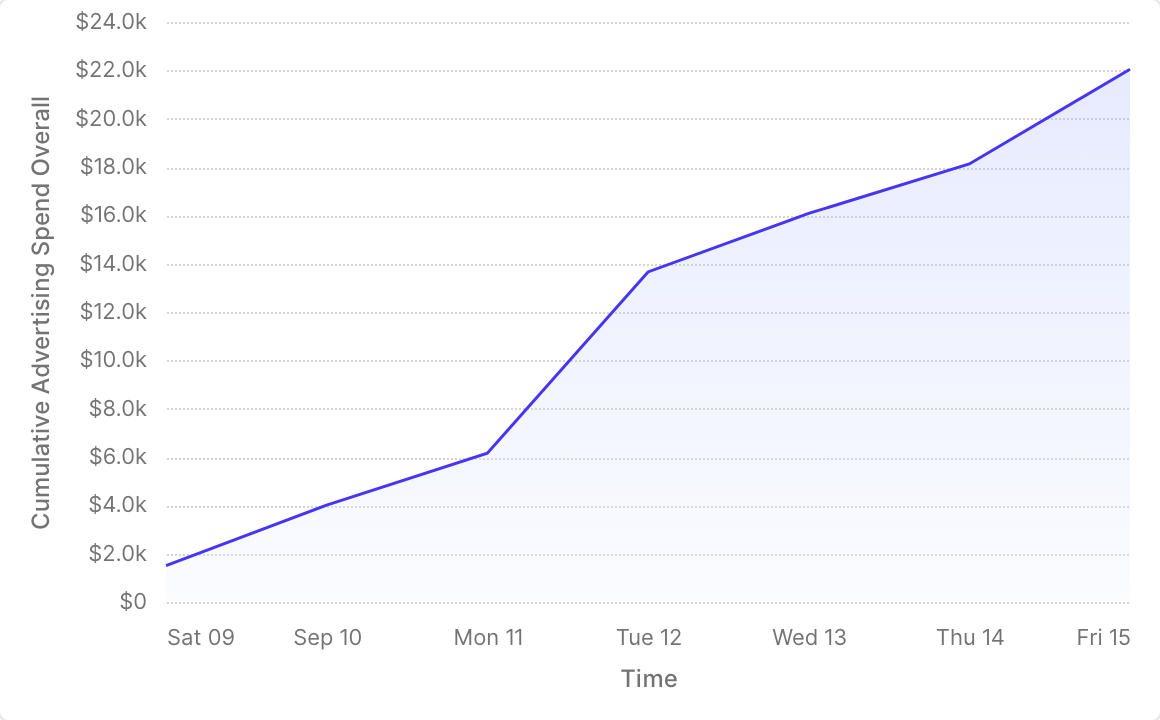
The cumulative sum of a measure over time, from x_axis and measure params and a query that selects both, ordered by time. Metrics SQL can't compute values across rows, but a Vega-Lite window transform can, over the rows the query returns. The same approach gives moving averages, ranks and shares of a total.
vega_spec: |
  {
    "$schema": "https://vega.github.io/schema/vega-lite/v5.json",
    "width": "container",
    "height": "container",
    "autosize": { "type": "fit", "contains": "padding" },
    "data": { "name": "query1" },
    "transform": [
      {
        "window": [{ "op": "sum", "field": "{{ .params.measure }}", "as": "running_total" }],
        "sort": [{ "field": "{{ .params.x_axis }}" }]
      }
    ],
    "mark": { "type": "area", "line": true, "opacity": 0.3 },
    "encoding": {
      "x": {
        "field": "{{ .params.x_axis }}",
        "type": "temporal",
        "title": "{{ .fields.x_axis.display_name }}"
      },
      "y": {
        "field": "running_total",
        "type": "quantitative",
        "title": "Cumulative {{ .fields.measure.display_name }}",
        "axis": { "formatType": "{{ .fields.measure.format_type }}" }
      },
      "tooltip": [
        { "field": "{{ .params.x_axis }}", "type": "temporal", "title": "{{ .fields.x_axis.display_name }}" },
        {
          "field": "{{ .params.measure }}",
          "type": "quantitative",
          "title": "{{ .fields.measure.display_name }}",
          "formatType": "{{ .fields.measure.format_type }}"
        },
        {
          "field": "running_total",
          "type": "quantitative",
          "title": "Cumulative",
          "formatType": "{{ .fields.measure.format_type }}"
        }
      ]
    }
  }
The running total is computed in the browser, over the rows within the query's LIMIT and the dashboard's time range. It starts at zero at the beginning of the time range, not at the beginning of the data.
Use the Theme Palette
A converted chart that splits into series keeps the scheme Flint chose on its color encoding:
"color": {
  "field": "{{ .params.color }}",
  "type": "nominal",
  "sort": null,
  "scale": { "scheme": "tableau10" },
  "title": "{{ .fields.color.display_name }}"
}
Remove the scale and the series take the qualitative colors of the dashboard's theme instead.
Highlight a Series from the Legend
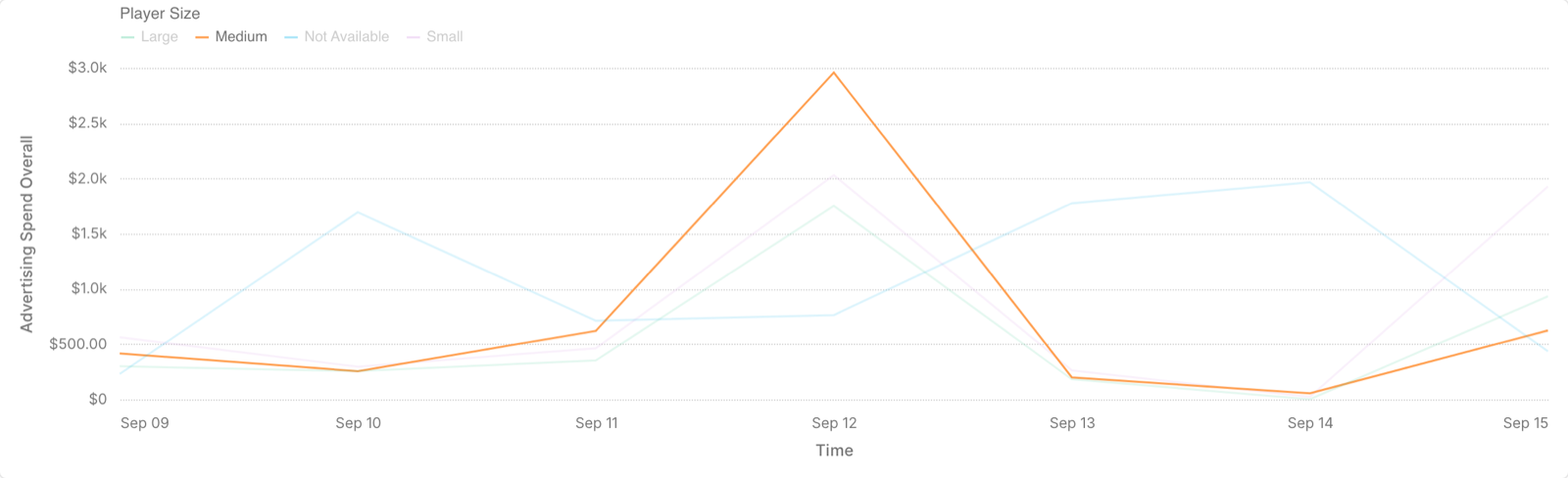
A point selection bound to the legend: clicking a legend entry highlights its series and fades the others. This is the gallery's multi-series line chart after converting, with the same x_axis, y_axis and color params. It has no scale on color, so it also uses the theme's palette, and its time axis is formatted as in A Second Axis.
vega_spec: |
  {
    "$schema": "https://vega.github.io/schema/vega-lite/v5.json",
    "width": "container",
    "height": "container",
    "autosize": { "type": "fit", "contains": "padding" },
    "data": { "name": "query1" },
    "params": [
      {
        "name": "segment",
        "select": { "type": "point", "fields": ["{{ .params.color }}"] },
        "bind": "legend"
      }
    ],
    "mark": "line",
    "encoding": {
      "color": {
        "field": "{{ .params.color }}",
        "type": "nominal",
        "title": "{{ .fields.color.display_name }}"
      },
      "opacity": {
        "condition": { "param": "segment", "value": 1 },
        "value": 0.15
      },
      "x": {
        "field": "{{ .params.x_axis }}",
        "type": "temporal",
        "title": "{{ .fields.x_axis.display_name }}",
        "axis": { "format": "%b %d", "tickCount": "day" }
      },
      "y": {
        "field": "{{ .params.y_axis }}",
        "type": "quantitative",
        "title": "{{ .fields.y_axis.display_name }}",
        "axis": { "formatType": "{{ .fields.y_axis.format_type }}" }
      },
      "tooltip": [
        { "field": "{{ .params.x_axis }}", "type": "temporal", "title": "{{ .fields.x_axis.display_name }}" },
        { "field": "{{ .params.color }}", "title": "{{ .fields.color.display_name }}" },
        {
          "field": "{{ .params.y_axis }}",
          "type": "quantitative",
          "title": "{{ .fields.y_axis.display_name }}",
          "formatType": "{{ .fields.y_axis.format_type }}"
        }
      ]
    }
  }
The selection lives in the chart only. It doesn't filter the dashboard or other widgets.