Rill 0.90 - Ad Hoc Measures, Canvas Maps, AI Skills, Unified MCP Server, Bookmark Manager and Databricks Lakehouse//RT
⚡ Rill's BI-as-code powers fast dashboards, embedded analytics, and an agent-ready semantic layer — all running on top of the warehouses you already use.
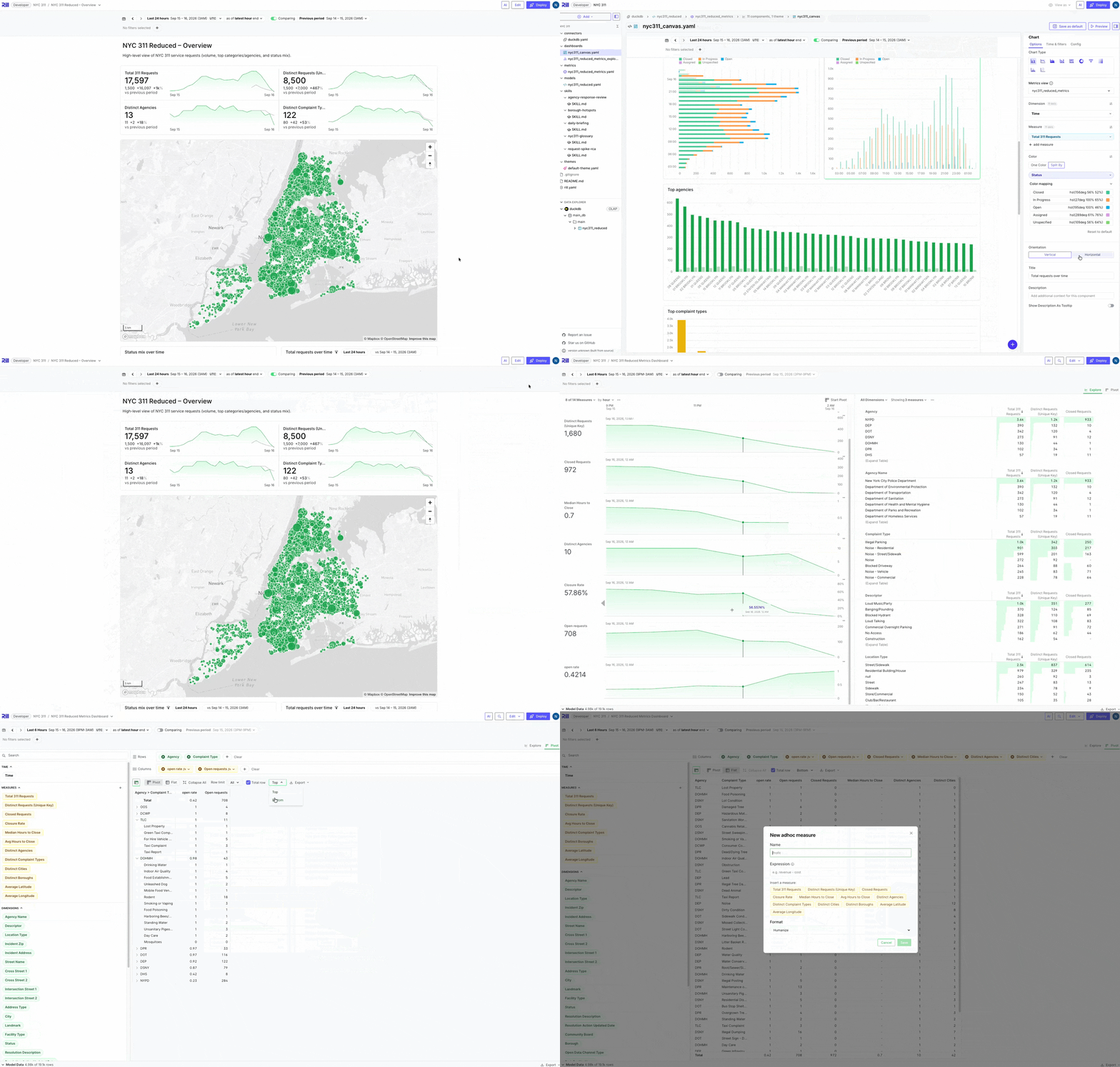
🗺️ Canvas Dashboards: Map Component, Horizontal Bars and Per-Widget Comparisons
This release brings a round of upgrades to canvas dashboards:
- Map component. Plot a dimension that holds point or polygon geometries, as DuckDB spatial values or GeoJSON, on an interactive Mapbox map. Color features by a measure, optionally size points by another, and get hover tooltips, automatic bounds and configurable color scales. Filters and time controls work as they do for every other canvas component.
- Horizontal bar charts. Bar, stacked bar and normalized stacked bar charts can be drawn horizontally by placing the measure on
xand the dimension ony. The inspector gains an Orientation switcher, and sorting, tooltips and comparisons work as they do for vertical bars. - Per-widget time range and comparison. Each component can follow the canvas, turn comparison off, or compare against its own range through
time_filters, using a newinheritvalue fortrandcompare_tr. The inspector's Time & filters tab mirrors the YAML. - Smarter axis labels. Categorical x-axis labels pick their orientation automatically: upright when they fit, angled when they do not, and vertical only when bands are very narrow. Long labels truncate instead of consuming the chart's height. An explicit
labelAngleis still respected. - Hide local filter chips. Set
hide_local_filters: trueon a component to hide its filter chips while the filters still apply. - Dark mode images. The image component accepts a
dark_urlshown when the app is in dark mode. - Pin the totals row at the bottom. Pivot tables in Explore and Canvas can pin the totals row to the bottom via a Top/Bottom selector next to the "Total row" checkbox, persisted in the URL and bookmarks as
totals_row_position.
🧮 Ad Hoc Measures in Explore and Canvas
You no longer need to edit a metrics view to answer a one-off question. Ad hoc measures let you define a new measure from existing ones directly in the dashboard — for example profit = revenue - cost or margin = (revenue - cost) / revenue. In Explore, create them from the measures selector or the pivot sidebar and they appear in every view, from big numbers and time series to leaderboards and pivot tables, including comparisons, conditional formatting and exports. In Canvas, every component with a measure field accepts calculated measures from the inspector. Definitions are stored in the dashboard URL and in bookmarks, so shared links reproduce them, and access policies are enforced through the measures an expression references.
🧠 AI: Project Skills and One MCP Server for All Your Projects
Projects can now define skills: instruction files that teach Rill's AI agents project-specific practices, such as a root-cause-analysis playbook for revenue drops or a business glossary. Skills follow the open Agent Skills format (skills/<name>/SKILL.md), so a skill written for Rill also works in Claude Code, Cursor and other agent clients, and vice versa. Invoke a skill explicitly by typing / in the analyst chat, and the chat activity trace shows when one was loaded so you can iterate on it. Skills are also offered to external MCP clients through new list_skills and load_skill tools.
Rill Cloud now serves a unified MCP endpoint at https://api.rilldata.com/v1/mcp that exposes every project you have access to, so Claude, ChatGPT and other clients connect once instead of once per project. A new list_projects tool lets the client discover projects, and calls are routed to the right runtime. Separately, each project's MCP server now exposes the developer file tools (list_files, read_file, search_files and write_file) to callers with edit access, and Rill Cloud chat gained prominent "Query your metrics from Claude, ChatGPT, and more" entry points that walk you through connecting your client.
🔖 Bookmark Manager
Bookmarks were only reachable from a single dashboard's dropdown. The project home page now shows a Bookmarks section beneath Dashboards, and a new Bookmarks tab lists every bookmark you can see across dashboards, with search and sorting by last used, last updated, name or dashboard. Owners and users with the manage-bookmarks permission can edit a bookmark's name, description and category or delete it from the list.
🔄 Automatic Schema Evolution for Incremental Models
Incremental models no longer need hand-written pre_exec statements to cope with upstream schema changes. A new on_schema_change setting controls what happens when a new partition or merge produces columns that do not match the existing table: fail (the default) reports the added and missing columns, ignore keeps the existing columns and discards new ones, and append_new_columns alters the table to add new columns automatically. Applies to merge and partition_overwrite models on DuckDB.
🧱 Databricks Lakehouse//RT Support
Rill's Databricks connector now works with Lakehouse//RT real-time warehouses, in both live OLAP and ingestion modes. Lakehouse//RT is Databricks' low-latency engine for real-time analytics, and pairing it with Rill's metrics layer means dashboards on fresh, streaming data stay fast and interactive as the data lands. Getting started takes nothing extra: add an RT warehouse the same way you add any Databricks SQL warehouse and Rill detects it and uses the right protocol automatically, while existing SQL warehouse connections continue to work unchanged.
Bug Fixes and Improvements
Explore / Dashboards
- Unified the expression filter implementation across Explore, Canvas, alerts and reports so filter behavior and state are consistent everywhere
- Fixed an explore and a canvas sharing a name being conflated in the dashboards list, favorites and breadcrumbs
- Rendered previous-period comparison lines in the Time Dimension Detail line chart
- Fixed the workspace
viewsearch param colliding with the exploreview=pivotparam and blanking the editor - Fixed PNG chart exports showing the comparison range when comparison is off, and removed the Rill label from embedded exports
- Resized Vega explore charts in place instead of re-embedding on every frame
- Fixed the measures section breaking on explores without a time series
- Fixed the calendar input always showing a warning for smaller grains
- Fixed pivot rows not updating reactively
- Wrapped long values in the pivot cell hover tooltip and long display names in the measures tooltip
- Made the bookmarks dropdown scrollable so long managed lists are reachable
- Fixed themed dashboards leaking Rill's default hover, accent and focus colors
- Fixed several surfaces rendering a white background in dark mode
- Added validation for duplicate dimensions and measures in explore specs
- Skipped totals queries for measures with
required_dimensionsin big numbers and canvas KPIs - Fixed the global dimension search failing on Druid because
valueis a reserved keyword
Canvas
- Fixed canvas custom comparison not applying
- Fixed canvas dashboards failing to load with non-UTC timezones
- Fixed canvas PDF export coming out blank in Safari
- Validated the metrics views referenced by canvas default filters instead of silently dropping the filters
Alerts and Reports
- Fixed AI report email links: recipients land directly on the AI conversation the report produced, can read it without signing in, and logged-in users can continue the conversation under their own account
- Allowed AI reports to inherit the metrics view watermark (
watermark: inherit) so time ranges resolve against the latest data instead of the trigger time - Made a report's opening message read as a sentence instead of the raw instructions it was run with
- Kept the create and edit alert dialog within the viewport on small windows
- Fixed the alert trigger selection not being highlighted
- Fixed a stack overflow when a report opened through a recipient token expanded security rules recursively
Cloud Editing
- Added "View as" support while editing a project in Rill Cloud
- Added a
rill sudo project edit --cloud-editing-disabledflag to hide cloud editing for a project
Project Files
- Added a top-level
metadata:map to every resource for attaching your own key-value information, such as owner, tier or data classification; it is exposed as-is on the resource'smetaover the API, can be set from SQL annotations (-- @metadata.key: value), and is inherited by inline explores
Models and Connectors
- Supported query attributes in the Databricks OLAP driver
- Upgraded the embedded DuckDB to 1.5.5
- Fixed renamed DuckDB views breaking after restarts in some cases
- Restarted DuckDB on transaction context errors
- Fixed a data race between reconcilers and the catalog flush
- Fixed dictionary replacement with staged models not working
- Fixed transfers from MySQL and Postgres to DuckLake throwing "database already attached" after a failure
- Narrowed unnested Druid dimensions to filtered values using
MV_FILTER_ONLYandMV_FILTER_REGEX - Rejected metrics SQL queries without a
FROMclause - Increased the maximum number of files in a project to 10,000
- Accepted legacy DAX comparison offsets in the legacy time range parser
AI / LLM
- Fixed the
develop_filesub-agent silently dropping its file listing, project status, current file contents and skills - Stopped the developer agent from creating a duplicate stand-alone explore when the metrics view already defines an inline one
- Taught the developer agent how to create derived metrics views (
parent,parent_dimensions,parent_measures) - Counted Gemini thinking tokens as output tokens for accurate usage tracking
- Returned
ai_instructionsfrom thelist_metrics_viewsMCP tool - Tolerantly decoded stringified JSON object arguments in MCP tool calls, applying coercion only after validation fails
- Updated the AI resource-authoring skills with guidance for StarRocks, Databricks and DuckLake connectors, the Gemini provider, rollups, tags, glob partition windows and canvas tab groups
- Added an Agent Skills docs section for the skills generated by
rill init --agent
Access
- Fixed projects that deny every resource to a user showing an endless spinner; embedded explore and canvas dashboards now render an access-denied page instead
Cloud
- Added assigning user groups at invitation time from the Add users and Add guests dialogs, the CLI (
rill user add --group) and the API; pending invitees appear in the group's member list, and a "Manage groups" action is available on every user and guest row - Added a Deployment slots panel under Status → Branches for project admins to change production and development slot allocations; slot changes only reconcile the affected environment, and new projects default to two slots each
- Added an org-level default runtime provisioner; choosing a provisioner at the org or project level is now a superuser-only operation
- Restored the SQLite metastore from its backup on startup when the local database is empty, and raised the backup size limit to 15 GB
- Fixed server-side search and role filtering for org users so results beyond the first page are found
- Paginated the GitHub organization listing so users in many organizations see all of them when connecting a repository
- Added
rill sudo project dump-instancesfor auditing instance configuration across runtimes - Handled out-of-order payment failure events
- Prevented repeated billing event checks for ClickHouse
- Added the Google Cloud SDK and GKE auth plugin to the Docker image
Embedding
- Fixed the
setValidStateembed API failing withtr=infand no time grain
Security
- Fixed the query result cache leaking across security contexts by including the full security claims in the cache key
- Upgraded
grpc,thriftand@tiptap/*to resolve Dependabot alerts