Incremental Models
Incremental models help with the ingestion of large datasets by allowing a dataset to be broken down into smaller sections for ingestion, rather than reading the entire dataset at once. Unlike standard SQL models that are created via a .sql file, incremental models are defined in a YAML file and are used when a large dataset needs to be incrementally ingested to improve ingestion costs and time.
If you are unsure about the required parameters, please review the reference page for Advanced Models.
Rill supports incremental models on either cloud storage or data warehouses, but the parameters to set these up will be different. Cloud storage requires the glob parameter while data warehouses will need to use sql.
See our reference documentation for more information.
Please reach out to us if you have any questions regarding incremental modeling!
Creating an Incremental Model
In order to enable an incremental model, you will need to set the following: incremental: true.
type: model
incremental: true

sql: # some SQL query from source_table
Incremental models default to an append strategy, and with neither state nor partition defined, your data will append data per incremental refresh from the source table. This will result in duplicate data and is not recommended. Instead, use the merge_strategy with a unique_key to ensure duplicate data is not ingested.
If you have late arriving data, you will need to keep this in mind when designing your incremental model. If you simply use max(date) from the source, you may risk leaving out late arriving data. Depending on your specific use case, you might consider a larger time difference and use a merge as your incremental_strategy.
Incremental Models with State Defined (Optional)
If your data is not partitioned, you can define the incremental model with a predefined state parameter. This is only useful for multi-connector incremental ingestion such as BigQuery to DuckDB.
type: model
incremental: true
connector: bigquery

state:
  sql: SELECT MAX(date) as max_date

sql: |
      SELECT ... FROM events
        {{ if incremental }}
            WHERE event_time > '{{.state.max_date}}'
        {{end}}
output:
  connector: duckdb
Once state is defined in an incremental model, its value can be used as a variable in your SQL statement. In the above example, the state gets the most recent date from the model and when incrementally refreshing, ingests data for events that are more recent than the state's max_date.
You can verify the current value of your state in the left-hand panel under Incremental Processing.
Refreshing an Incremental Model
When you are testing with incremental models in Rill Developer, you will notice a change in the refresh functionality. Instead of a full refresh, you are given the option for incremental refresh.
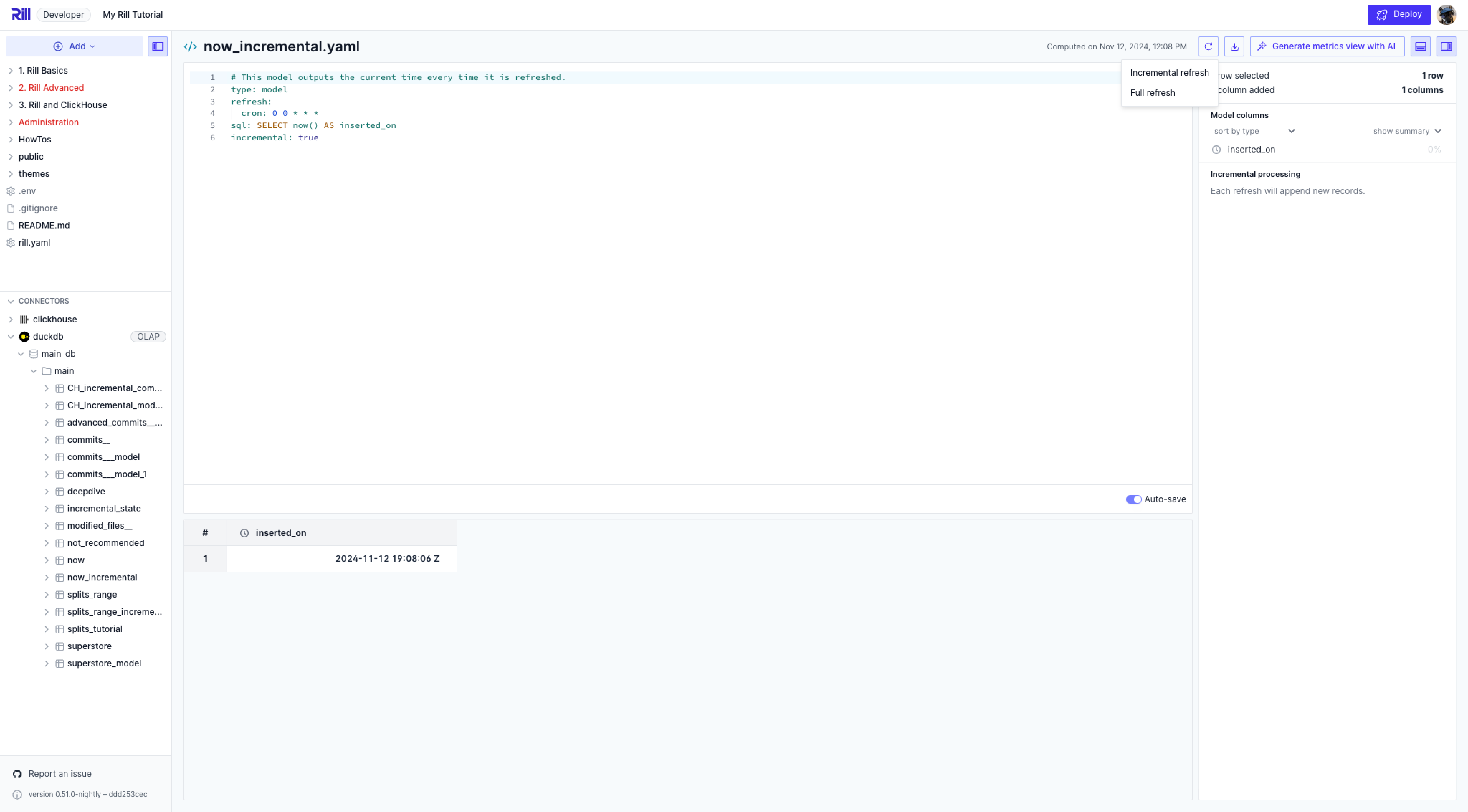
Once increments are enabled on a model, this grants you the ability to refresh the model in increments, instead of loading the full data each time. This is handy when your data is massive and re-ingesting the data may take time. For a project in production, this allows for less downtime when needing to update your dashboards when the source data is updated.
There are times when a full refresh may be required. In these cases, running the full refresh is equivalent to running a normal refresh with incremental disabled.
When selecting to refresh incrementally, what is being run in the CLI is:
rill project refresh --local --model <model_name>
Keep in mind that if you select Full refresh, this will start the ingestion of all of your data from scratch. Only use this when absolutely required. When running a full refresh, the CLI command is:
rill project refresh --local --model <model_name> --full
Model Change Modes
Configure how changes to your model specifications are applied:
# model.yaml
change_mode: reset  # Options: reset (default), manual, patch
reset: changing the model automatically leads to a full refresh (default)manual: changing the model stops refreshes until a manual incremental or full refresh is runpatch: changing the model automatically changes to the new logic without a reset (only works for models withincremental: true)
Handling Schema Changes
An incremental run can produce columns that differ from the model's existing table. For example, a new partition file can include a column that older files did not have, or a column can be dropped from the source query. The on_schema_change output property controls what Rill does when this happens.
output:
  incremental_strategy: merge
  unique_key: [id]
  on_schema_change: append_new_columns # Options: fail (default), ignore, append_new_columns
| Mode | New columns in the incoming data | Columns missing from the incoming data |
|---|---|---|
fail (default) | The run fails. | The run fails. |
ignore | Discarded. The table keeps its existing columns. | Kept in the table and set to NULL for the incoming rows. |
append_new_columns | Added to the table. Existing rows get NULL for the new columns. | Kept in the table and set to NULL for the incoming rows. |
Rows are inserted by column name, so a change in column order alone does not count as a schema change and never misaligns data.
Supported Strategies
on_schema_change applies only when the output connector is DuckDB and the model uses the merge or partition_overwrite incremental strategy. Setting it on a model that uses the append strategy is a validation error:
"on_schema_change" is only supported for the "merge" and "partition_overwrite" incremental strategies
Models that set a unique_key without an incremental_strategy use merge, and incremental partitioned SQL models without an incremental_strategy use partition_overwrite. Both default to fail.
Resolving a Schema Change Failure
With the default fail mode, a run that adds or drops columns stops before changing the table, and the model reports an error that names the columns:
the new data does not match the schema of table "events" (new columns: "country"; missing columns: none). Set "on_schema_change" to allow schema changes
To resolve it, do one of the following:
- Keep the new columns: set
on_schema_change: append_new_columnsand run an incremental refresh. - Keep the table's existing columns: set
on_schema_change: ignoreand run an incremental refresh. - Rebuild the table with the new schema: run a full refresh. Existing rows are re-ingested, so they are populated for every column.
rill project refresh --local --model <model_name> --full
Limitations
- Column types are not reconciled. The existing table's column types are always kept. DuckDB converts incoming values to those types and fails the run if a value cannot be converted. Run a full refresh to change a column's type.
- Key columns must already exist. A
mergerun fails if aunique_keycolumn is missing from the incoming data or from the existing table. To changeunique_key, run a full refresh. - Partition expressions must resolve against the incoming data. A
partition_overwriterun fails if thepartition_byexpression references a column that is not in the incoming data. - Changing
partition_byrequires a full refresh. If you keep the existing table (for example withchange_mode: patch) and pointpartition_byat a column the table does not have,append_new_columnsadds that column withNULLfor existing rows. Those rows never match a partition, so they are not replaced and can be duplicated by later runs. - Added columns are not backfilled. With
append_new_columns, rows ingested before the column was added keepNULLuntil you run a full refresh or refresh their partitions. - External DuckDB databases are changed in place. When the DuckDB connector uses
pathorattach(for example MotherDuck), a column added byappend_new_columnsremains in the table even if the insert that follows fails.
For the full property reference, see Models YAML.